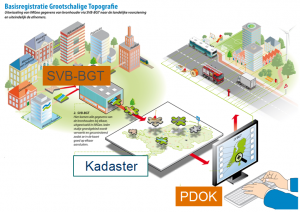
How can you be sure you’re using BGT data correctly in your work? In this one-on-one course, you’ll learn, step by step, how to reliably interpret and apply BGT data for spatial planning and geo-ICT projects. With personalized guidance, online modules, and hands-on assignments, you’ll develop practical skills that will help you avoid mistakes and work confidently with geodata.
Large-Scale Topography Database
The Large-Scale Topography BasicRegister (BGT) is an official digital map of the Netherlands, in which objects such as roads, rail lines, ditches, buildings, sites, and green spaces are recorded in a standardized manner. It is one of the government’s basic registers and provides up-to-date, reliable information about the physical environment.
The BGT is indispensable for organizations that work with geoinformation and geodata. Clear agreements on how data is recorded enable government agencies, engineering firms, and other parties to collaborate more effectively in planning, designing, and maintaining the built environment.
The BGT Basics course is intended for people who work with or want to start working in geo-ICT or spatial planning. During this BGT training, you will learn how the registry is structured, which government agencies provide data, and how to use this information in practice. Think, for example, of projects in the fields of infrastructure, urban development, or public space management.
Upon completion, you will understand how the BGT works and be able to independently apply the data in a variety of situations where geospatial data plays a central role.
What will you learn in this Blended Learning course?
In this practical BGT training, you’ll learn how to actually apply this knowledge in your work. You’ll gain insight into the structure of the registry, the relevant laws and regulations, and the link to other basic registries such as the BAG and BOR. You’ll work with commonly used software in the world of geo-ICT and apply geodata in realistic situations such as spatial planning and infrastructure management. Through practical examples, you’ll learn how to collect, verify, and use BGT data to analyze and improve the physical environment. Whether you work for a municipality, an engineering firm, or another organization in the field of geoinformation, this blended learning course provides you with the knowledge and skills to effectively work with BGT data.
Why choose this BGT Basics course?
Blended learning combines independent online learning with practical, interactive sessions. This allows you to gain both theoretical knowledge and practical experience with BGT data, geo-ICT, and the application of regulations. You can complete the online modules at your own pace. They include interactive lessons on the structure of the Large-Scale Topography Basic Registry, the use of geodata, and the integration with other registries such as the BAG and BOR. You’ll learn how to access, analyze, and apply BGT data within current work processes in the spatial domain.
You’ll apply what you learn immediately. During the hands-on online sessions, you’ll work with real BGT data. You’ll receive guidance from experienced trainers in the geo-ICT field. You’ll learn how to verify data for accuracy, how to link different registries, and how to apply geoinformation to issues such as public space management and infrastructure planning. By practicing with realistic scenarios, you’ll develop practical skills. Skills that are immediately applicable in your daily work with geospatial data.
Flexibility and practicality. That combination makes this blended learning course powerful. You’ll not only learn to work with BGT and geo-ICT software, but also how to apply that knowledge effectively. After completing the course, you’ll be able to independently collect, assess, and use BGT data in a variety of situations. This will allow you to make better-informed decisions based on reliable information about the physical environment.
You'll receive personalized guidance. After you register, our course coordinator will contact you to schedule your first session.
Learning objectives
After completing this course, you will be able to:
Read and apply BGT data in geo-ICT projects.
Collect, verify, and process geodata.
Link BGT to registries such as BAG and BOR.
Work with geoinformation software for data analysis.
Use geospatial data for spatial decision-making.
Want to know more?
Do you have questions about the course content? Or are you unsure whether the course aligns with your learning goals or preferences? Would you prefer an in-company or private course? We’d be happy to help.