The skills you’ll gain in this course will enable you to guide students in developing 21st-century skills such as critical thinking, creative problem-solving, collaboration, and digital literacy, while simultaneously building in-depth knowledge of geographic and spatial concepts. Upon completion, you will be able to independently set up Minecraft projects that seamlessly align with your curriculum and inspire your students to view the world around them with fresh eyes.
What is Minecraft: Education Edition?
Minecraft: Education Edition is a specially developed version of the popular sandbox game Minecraft, designed with educational purposes in mind. This version offers all the creative possibilities of the original game, but adds key features that make it suitable for use in the classroom.
Some distinctive features of the Education Edition include:
- Classroom Management Tools: Teachers can easily invite students to a world, track their locations in the game, communicate via an in-game chat feature, and pause the game world when necessary.
- Collaboration Tools: Students can work together in groups on projects, building and solving problems collaboratively within the same virtual environment.
- Portfolio Functionality: Using the Camera and Portfolio tools, students can document, capture, and share their work, which facilitates assessment and reflection.
- Programming interface: With the Code Builder, students can program within Minecraft, which fosters computational thinking.
- Educational content: The Education Edition includes pre-built worlds, lessons, and activities aligned with various subject areas, including geography, history, science, and math.
What makes Minecraft: Education Edition particularly valuable for geography education is the ability to integrate and visualize real-world geographic data in an interactive 3D environment. It enables students to explore spatial concepts hands-on, rather than studying them solely in abstract form on paper or a screen. They can literally walk through landscapes, view buildings from the inside and out, and experiment with the layout of the space around them. In this course, you will learn how to make the most of this powerful educational tool by combining it with GIS tools such as QGIS, allowing you to transform geographic data into meaningful learning environments where students actively participate in their own learning process.
Benefits of Minecraft in Education
Using Minecraft: Education Edition in education offers numerous benefits that surpass traditional teaching methods, especially when it comes to teaching geographic and spatial concepts:
- Intrinsic motivation: Minecraft aligns with the everyday lives of many students, fostering natural interest and motivation. Students don’t view it as “schoolwork” but as a challenge they’re eager to tackle.
- Experimental learning environment: In Minecraft, students can experiment with spatial concepts without risk or cost. For example, they can try out different urban planning schemes and see the results immediately.
- Visualization of abstract concepts: Complex geographic concepts such as contour lines, water flows, or urban development become tangible and understandable in Minecraft’s 3D environment.
- Encouraging creative problem-solving: Minecraft encourages students to devise creative solutions to spatial problems, whether it involves building a stable bridge or designing a climate-resilient neighborhood.
- Inclusive learning: Minecraft’s accessibility and versatility make it suitable for various learning styles and levels, allowing all students to participate and experience success.
- Real-world application: When students work with real-world geographic data in Minecraft, they immediately make the connection between the virtual world and their own environment, making learning relevant and meaningful.
By leveraging these benefits, you can use Minecraft to create a learning environment where students are actively engaged in exploring and understanding geographic concepts. Instead of being passive recipients of information, they become designers, builders, and problem-solvers who construct their own knowledge through meaningful activities.
What You’ll Learn in the Minecraft for Education Course
In this one-day course, you will acquire all the essential knowledge and skills to effectively use Minecraft: Education Edition in your teaching, with a specific focus on geographic applications. From basic technical knowledge to designing educational assignments—this course offers a comprehensive overview of how you can transform Minecraft into a valuable educational tool.
Basic Knowledge of Minecraft: Education Edition
To effectively integrate Minecraft into your teaching, a solid foundation in working with the software is essential:
- Installation and configuration: You will learn how to install, configure, and prepare Minecraft: Education Edition for use in the classroom.
- Navigation and Basic Controls: You’ll familiarize yourself with the interface and controls so you can work confidently with the program.
- Classroom Management: You’ll explore the special tools Minecraft: Education Edition offers for classroom management, such as inviting students, tracking their activities, and managing the game environment.
This basic technical knowledge forms the foundation upon which you can build your educational Minecraft projects. By mastering these aspects, you can then focus on the creative and content-related possibilities the platform offers.
Integrating Geo-Data into Minecraft
One of the most valuable aspects of this course is learning to work with real geographic data in Minecraft, allowing you to make meaningful connections between the virtual and the real world:
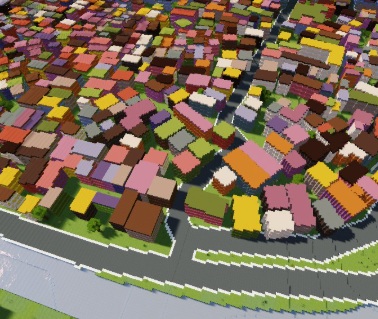
- Working with QGIS and BGT: You’ll learn how to download and process the Large-Scale Topography Database (BGT) using QGIS, an open-source geographic information system.
- Conversion of Geo-Data: Discover how to convert geographic data into formats usable in Minecraft, such as blueprints for buildings and neighborhoods.
- Scale and proportions: Learn how to determine the correct scale for your projects, ensuring that the virtual representations are accurate and educationally valuable.
These skills enable you to recreate local, recognizable environments in Minecraft, allowing students to immediately make the connection between the virtual world and their own living environment. This makes abstract geographic concepts concrete and meaningful.
Designing educational projects
With a solid technical foundation and knowledge of geodata integration, you will learn how to combine these elements into targeted educational projects:
- Developing learning objectives: You’ll learn how to formulate clear learning objectives that align with the curriculum and can be achieved using Minecraft.
- Setting up building projects: Explore different types of building projects, such as recreating existing environments or designing visions for the future focused on sustainable development.
- Creating challenges: Learn how to design meaningful challenges that encourage students to think critically, solve problems, and apply geographic concepts creatively.
- Assessment and evaluation: You’ll discover strategies for assessing and evaluating the learning process and outcomes in Minecraft, so you can monitor student progress.
By mastering these design aspects, you can transform Minecraft from a game into a powerful educational tool that aligns with your specific educational goals and the needs of your students.
Why Choose Our Minecraft for Education Course?
Our Minecraft for Education Course – Build the Future at Geo-ICT Training Center stands out thanks to a unique combination of technical expertise, pedagogical insights, and practical applicability. Here are a few reasons why this course is a valuable investment in your professional development:
- Specialization in geo-education: Unlike general Minecraft courses, our training focuses specifically on the integration of geographic data and concepts, which aligns perfectly with subjects such as geography, technology, and natural sciences.
- Immediately applicable results: You’ll leave the course with concrete examples and your own project that you can implement directly in your teaching practice, making it easy to put what you’ve learned into action.
- Connection between gaming and curriculum: We help you connect the playful elements of Minecraft with serious learning objectives and curriculum requirements, so you can get the maximum educational value out of the platform.
- Sustainable skills: The skills you develop in this course are not only relevant to Minecraft but also form a foundation for integrating various digital tools into your teaching.
By choosing this course, you’re investing not only in a new technical skill but also in your ability to convey geographic and spatial concepts to your students in an innovative and engaging way. Whether you’re a geography teacher, media coach, IT coordinator, or educational designer, this course offers new perspectives and tools to enrich and revitalize your teaching.
Join the growing community of educational professionals who are using Minecraft to transform learning from passive to active, from abstract to concrete, and from individual to collaborative.

 In today’s education, there is a growing search for innovative ways to make complex concepts appealing and understandable to students. Minecraft, with over 238 million copies sold worldwide, is not only a popular game but also a powerful educational platform that motivates and engages students. The Education Edition of Minecraft was developed specifically for educational purposes and offers countless opportunities to explore geographic information, spatial concepts, and sustainability issues in a digital, interactive environment. In this course, you will learn how to combine Minecraft: Education Edition with real geographic data to create educational projects that are both instructive and motivating. By using
