
In the construction course, students gain a better understanding and overview of the construction industry in general and the application of CAD and GIS in particular.
Construction and Civil Engineering
In the construction course, students gain a better understanding and overview of the construction industry in general and the application of CAD and GIS in particular.
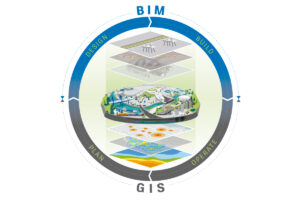 Construction engineering encompasses the essential principles and techniques required to bring construction projects to fruition. From the initial design to the final construction, it is a field in which precision, sustainability, and innovation are central.
In particular, the rise of geoinformation and geodata has revolutionized how we think about construction. These technologies make it possible to analyze land and space with unprecedented accuracy. As a result, construction projects can be carried out more efficiently, safely, and in greater harmony with their surroundings. Consider, for example, the use of GIS (Geographic Information Systems) to identify the best locations for construction projects. Or CAD (Computer-Aided Design) software such as AutoCAD and Revit for designing detailed 2D and 3D models of buildings.
Our Construction Course covers not only these modern technologies. It also explores traditional construction techniques and how they can be integrated with new methods. Through this course, you will understand how civil engineering, construction engineering, and geoinformation technology work together to realize the construction projects of tomorrow. Whether it involves designing a small house or planning large-scale construction projects, the knowledge and skills you gain here will prepare you for a future in which you can contribute to shaping our built environment.
Interested in pursuing civil engineering further? Check out our civil engineering program!
Construction Engineering is the foundation of the construction sector, where knowledge, skills, and technology converge to create buildings and infrastructure that are not only functional and sustainable but also aesthetically appealing. It encompasses a wide range of disciplines, including civil engineering, architecture, and environmental sciences. Additionally, it utilizes advanced software and methods to achieve this goal.
Some key aspects of civil engineering include:
Geo-ICT’s Construction Course offers a comprehensive look at these aspects and equips students with the knowledge and skills needed to succeed in this dynamic field. By focusing on both traditional construction techniques and modern technological applications, this course prepares you for a future in which you can contribute to the design and realization of innovative construction projects.
The integration of Geo-ICT within the construction sector has had a revolutionary impact on how projects are planned, executed, and managed. Geo-ICT plays a key role in making construction processes more efficient and effective. These technologies enable us to analyze complex geodata and geo-information. This results in better-informed decision-making and more innovative designs. Let’s take a look at some specific benefits of Geo-ICT in construction:
Geo-ICT thus not only provides tools for improving the technical aspects of construction projects but also contributes to more sustainable and safer construction practices. Geo-ICT’s Construction Course is designed not only to familiarize you with the fundamentals of construction engineering but also to develop your skills in using Geo-ICT applications. This prepares you for a future in which you can contribute to the realization of advanced and sustainable construction projects, with a solid foundation in both traditional construction techniques and modern Geo-ICT solutions.
In the modern construction sector, professional skills in CAD (Computer-Aided Design) and BIM (Building Information Modeling) software have become indispensable. These technologies have fundamentally changed the way construction projects are designed, analyzed, and executed. By taking Geo-ICT’s Construction Course, you’ll have the opportunity to master these essential skills. Let’s take a look at the benefits this software offers:
Geo-ICT’s approach to teaching these skills focuses on practical application. You’ll learn how to use these tools to solve real-world problems in construction. The course includes:
Developing professional skills in CAD and BIM software is crucial for anyone who wants to succeed in the construction industry. By taking this course, you’ll take an important step toward preparing for a future where you can contribute to the creation of innovative and sustainable construction projects.
The use of GIS (Geographic Information Systems) in construction projects is having a transformative impact on the sector. These advanced systems provide in-depth insights into geographic data, which is crucial for the planning, execution, and management of construction projects. GIS enables construction professionals to:
In Geo-ICT’s Construction Course, you’ll have the opportunity to apply the power of GIS in the context of construction projects. This includes hands-on training in:
The application of GIS in construction projects goes beyond just the technical aspect. It contributes to the development of more sustainable, safer, and more integrated projects. By taking the Construction Course, you will not only improve your technical skills but also gain a deeper understanding of how geoinformation can be used to innovate and improve the construction sector.
The combination of CAD and GIS forms a powerful toolkit for professionals in the construction sector. It enables informed decisions to be made throughout the entire construction process. These technologies offer in-depth insight into both the design and the context of construction projects. This allows for improved decision-making in a number of crucial areas:
The Construction Course at Geo-ICT places a strong emphasis on developing skills in both CAD and GIS. The goal of the course is to provide you with:
By taking this course, you will not only become proficient in using these tools but also develop a deep understanding of how informed decision-making can promote the success of construction projects. This will enable you to contribute to the development of projects that are both technically advanced and environmentally responsible.
Choosing the right program is crucial for your future in the construction industry. Our Construction Course at Geo-ICT stands out thanks to a unique combination of in-depth knowledge and practical skills, focusing on both the traditional aspects of construction engineering and the latest technologies. Here are a few reasons why our course is the perfect choice for anyone looking to take their career in the construction industry to the next level:
Choosing the Construction Course at Geo-ICT means investing in a future where you’ll be equipped not only with the knowledge and skills needed to succeed in the construction industry, but also with the confidence and networks essential for your career development. Our course has been carefully designed to prepare you for the challenges and opportunities of the modern construction industry. It places a strong emphasis on geoinformation and advanced technologies such as CAD and GIS.
On the first day of the construction course, you’ll receive a general introduction to construction. This will set the stage for the course. A great deal of map data is required at the start of a construction project. You will learn what types of map data are available and how to access them. Using QGIS, you will consult, download, and modify the basic registrations from the Land Registry, Large-Scale Topography, and Addresses and Buildings databases for use in a civil engineering project. On this first day, you will also get started with AutoCAD. You will become more familiar with AutoCAD, with an emphasis on the practical aspects of drafting. The interface and settings will be reviewed, after which you will begin with exercises. Various objects will be drawn, such as lines, circles, arcs, rectangles, and triangles. Next, you will explore how objects can be modified: deleting, rotating, moving, scaling, and mirroring.
On the second day, text and tables will be added to the drawings. The use of layers in drawings is important for keeping elements separate. In addition, extensive attention will be given to object snaps and grips, blocks, and surface hatching. The relationship between model space and paper space will also be covered.
In the afternoon, you will receive an introduction to Revit Architecture. You will get an overview of the menus and all functions. The program allows you to create drawings based on parametric models. With Revit Architecture, you can model and view 3D architectural models.
The instructor explains in general terms how architectural drafting has evolved in recent years and where we stand today. The instructor also discusses the Building Information Model (BIM) and the exchange of architectural models. In AutoCAD, you could still call it drawing, but in Revit Architecture, it’s more about assembling and modeling. Once you have a model that is well-structured and fully populated, you can benefit enormously from it as a contractor.
You will explore architectural models in Revit. This will give participants a good overview of the software. Afterward, participants will open several models in Revit and perform various exploration tasks on them, such as:
After this day, participants will realize the practical value of having and using such an architectural model.
The students will build and modify an architectural model. However, before you have a model that is fully complete and usable, some work is required beforehand. On this day, the students will import an architectural floor plan, a DWG file from AutoCAD, into Revit Architecture. That is the starting point of the model that we will now continue to build.
The participants will:
Any change to the model is immediately applied to all related areas. This ensures that the entire presentation of the model remains up to date. A BIM model can also contain information for various disciplines and for different construction phases (from concept through demolition). This is made possible by the underlying relational database architecture, which the developers refer to as the parametric change engine.
In the Construction CAD & GIS course, participants will learn the following:

Do you have questions about the course content? Or are you unsure whether the course aligns with your learning goals or preferences? Would you prefer an in-house or private course? We’d be happy to help.
The Construction Course at Geo-ICT Training Center is a specialized program focused on the application of CAD and GIS in the construction industry. This course provides both theoretical knowledge and practical skills in software such as AutoCAD and QGIS.
This course is ideal for entry-level geotechnical specialists, experienced geotechnical professionals, companies in the geotechnical sector, individuals seeking career transitions, and educational institutions looking to expand or refresh their knowledge in the construction industry.
The course includes training in various software programs, including AutoCAD for basic 2D design, Revit Architecture, and QGIS, focusing on both 2D and 3D data as well as object-oriented data.
The course lasts 3 days and offers intensive training in CAD and GIS applications in the construction industry.
The program is designed for students in vocational and higher vocational education who wish to enter the construction industry from a different field, as well as for current professionals looking to expand their knowledge.
The course focuses on providing insight into the construction industry, applying CAD and GIS in construction projects, and using geoinformation in large-scale construction projects.
Upon completion of the course, you will receive official Autodesk ATC certificates for AutoCAD Basic 2D and Revit Architecture.
On the first day, you’ll receive an introduction to civil engineering and learn how to work with maps and the basic functions of AutoCAD.
The second day focuses on further learning AutoCAD, with an emphasis on the practical aspects of drawing and modifying objects.
After the course, you’ll have two more weeks to ask the instructor questions via email, and you’ll also have the option of Online Support for personalized one-on-one lessons.
