
This GitHub course is relevant to you if you create websites, web applications, or mobile apps, or if you write code of any kind. GitHub is the most widely used version control system.
Programmeertalen
This GitHub course is relevant to you if you create websites, web applications, or mobile apps, or if you write code of any kind. GitHub is the most widely used version control system.
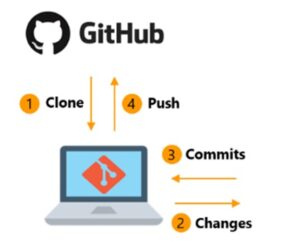 In the world of software development, it is essential to have a system that not only securely stores your code but also enables you to collaborate efficiently and track changes. Git is precisely the tool that fulfills this crucial role. As a distributed version control system, Git enables individual developers and teams to work on the same projects without compromising the integrity of the work.
Git stands out for its flexibility in managing projects of any scale, from small teams to large, distributed collaborations. With features such as branching and merging, developers can work on separate features or fixes without disrupting the project’s main branch, and then seamlessly merge their changes back in. This promotes a streamlined development process where innovation takes precedence, while consistency and stability are ensured.
Furthermore, with integration into GitHub, a platform that supports Git, collaboration is simplified even further. GitHub offers a visual interface and tools that make it easier for teams to review code, discuss changes, and contribute to open-source projects. This makes it not only a powerful tool for professional developers but also an essential learning resource for those new to the world of coding.
Geo-ICT’s GitHub course takes you on an in-depth exploration of Git, from basic setup to advanced collaboration techniques.
At the heart of every software development project lies change management: who changes what, when, and why. This is where version control systems (VCS) play a crucial role, and Git is a true pioneer in this field. But what makes version control systems so essential for developers and teams working with geoinformation and geodata?
A version control system allows you to track every change to a file or a set of files over time, so you can retrieve specific versions later. For teams working on large projects, this is invaluable. It means that if you make a mistake or something goes wrong, you don’t have to start over. You can easily revert to an earlier, working version of your project.
For projects in the world of geoinformation, a robust VCS like Git offers not only security but also a platform for streamlined collaboration. It allows teams to work on different parts of a project in parallel without conflicts between changes—an essential factor in efficiently achieving project goals.
Furthermore, by tracking who made which changes, version control systems provide a clear overview of the project history. This is not only useful for current team members to understand how the project has evolved, but it is also indispensable for new members getting up to speed on the project. They can see how decisions were made and how the project reached its current state.
In our GitHub Course, you’ll not only learn how to use Git effectively for version control, but you’ll also gain insight into how these technologies improve collaboration and project development.
In the rapidly evolving world of technology and geoinformation, the complexity of projects and the need for accurate data management are only increasing. And Git plays a central role here as an indispensable tool for developers. But what makes Git so essential, not only as a version control system but also as a foundation of modern software development?
First, Git offers unmatched flexibility in managing code changes. This allows developers to work on complex projects individually and in teams without fear of data loss or conflicts. This flexibility fosters a culture of experimentation and innovation. Here, new ideas can be safely tested and developed without jeopardizing the main project.
Additionally, Git makes collaboration among developers more efficient and transparent. With Git, teams can easily track changes, understand the origin of code, and work on joint projects with a clear overview of contributions and modifications. This is particularly valuable in projects focused on geoinformation, where data precision is crucial and collaboration often spans geographical and organizational boundaries.
Furthermore, Git supports continuity in software development. By documenting every change and providing an easy way to revert to previous versions, Git ensures that projects are resilient against unforeseen issues. This feature is indispensable in an environment where projects are becoming increasingly complex and the margin for error is shrinking.
This makes it clear that Git is more than just a tool. It is an essential part of modern software development practice. It enables developers, teams, and projects to thrive in the complex landscape of technology and geoinformation.
The journey to mastering Git begins with the first, essential step: installing Git. It may seem like a small step, but it sets the tone for the advanced levels of software development and project management you’ll discover. At Geo-ICT, we ensure that you not only learn how to install Git, but also understand what Git does under the hood once it’s running on your machine.
Once Git is installed, you’ll dive into the world of basic commands, the building blocks of Git. These commands aren’t just commands. They’re your tools for navigating and managing the vast sea of your code. You’ll learn about git init, which lets you start a new repository on your local machine—an action that lays the foundation for every new project. Then there’s git add, which lets you add files to your next commit. And git commit, which lets you take a snapshot of those files—an indelible mark on your project’s timeline.
But why are these commands so important? In the context of geoinformation and geodata, these commands offer a way to efficiently manage changes and streamline collaboration. They enable you to carefully track and review modifications—essential for maintaining the integrity and accuracy of the project.
Our course delves deeper into these commands, not only by teaching you how to use them, but also by showing you how they fit into the bigger picture of project development and collaboration. Whether you’re a beginner taking your first steps into the world of software development, or an experienced developer looking to deepen your knowledge. Our course offers the guidance and insights you need to master these commands and more.
In today’s world of software development and geoinformation, collaboration is not just desirable—it’s essential. This is where GitHub comes in. This platform is used by millions of developers worldwide to collaborate on projects of any scale. But what makes GitHub such a powerful collaboration tool?
GitHub builds on the capabilities of Git by offering a visual and user-friendly interface that makes it easy to collaborate, manage changes, and oversee projects. It doesn’t matter if you’re on the other side of the world. With GitHub, you can contribute to projects as if you were sitting right next to your teammates. This makes it ideal for projects in the geospatial sector, where teams are often spread across different locations.
One of GitHub’s most valuable features is the ability to create and review pull requests. This allows team members to propose changes and receive feedback before those changes are integrated into the project’s main branch. This approach fosters a culture of openness, where every team member can contribute to improving the code and the final product.
In addition, GitHub offers issue tracking, an essential project management tool that allows you to create, assign, and track tasks. This is particularly useful for managing complex projects in the geospatial sector, where keeping track of tasks and milestones is crucial to the project’s success.
So while Git lays the foundation for version control and collaboration, GitHub takes these capabilities to the next level, enabling teams in the geoinformation sector to thrive.
In a world where digital skills are becoming increasingly important, our GitHub Course at Geo-ICT stands out thanks to a unique combination of in-depth knowledge, practical experience, and a passion for innovation in the geoinformation sector. But why should you choose our course specifically? What makes it the ideal choice for anyone looking to improve their skills in Git and GitHub?
First and foremost, our course offers a hands-on approach. Unlike many other courses that limit themselves to theoretical knowledge, Geo-ICT enables you to immediately apply what you learn in realistic project scenarios. This means you not only learn about Git and GitHub, but also how to use these tools to collaborate effectively on projects focused on geoinformation and geodata.
In addition, our course is designed to provide insight into the latest trends and technologies in the world of software development, with a special focus on the geoinformation sector. By participating, you’ll not only stay up to date on the latest developments but also learn how to integrate them into your own projects.
Furthermore, our course is taught by experts in the field with years of experience in both teaching and the practical application of Git and GitHub in professional projects. These instructors not only impart their extensive knowledge but also share valuable insights and best practices you won’t find anywhere else.
In short, our course is an investment in your future as a developer in the rapidly growing world of geoinformation and geodata. We offer a unique combination of practical application, insight into the latest developments, expert instruction, and a supportive community. This means we provide everything you need to succeed and take your career to the next level.
In this GitHub course, we’ll start with the basics of Git, where you’ll learn how to install Git. We’ll go over the basics of the terminal. We’ll create our first local repository, and you’ll see how to save different versions of the project as snapshots using commits.
Next, we’ll move on to learning how to go back in time and review, update, or even delete previous states of the project using `git checkout`, `git revert`, and `git reset`.
Once we have a solid understanding of Git, we’ll start learning the basics of GitHub. We’ll cover topics such as creating a repository on GitHub, connecting the local repository to a remote one, making commits, and much more.
Next, we’ll explore one of Git’s best features: branching. You’ll learn how to manage branches both locally and remotely. Then we’ll move on to more complex topics. We’ll show you how to merge branches using various methods and how to handle merge conflicts.
Next, you’ll learn about forking and contributing. You’ll learn how to copy someone else’s remote repository to your GitHub account, how to clone it to your local computer, and how to contribute to the original project.
Finally, we’ll discuss how to collaborate on GitHub. We’ll cover important topics, such as setting up a collaboration team, defining different rules for contributors, and much more.
Throughout the course, if you have any questions, feel free to ask them in the Q&A section. You’ll receive quick and helpful support.

Do you have questions about the course content? Or are you unsure whether the course aligns with your learning goals or preferences? Would you prefer an in-house or private course? We’d be happy to help.
In our GitHub Course, you'll learn the basics of Git and GitHub, including how to install Git, use basic commands, and manage repositories and collaborations on GitHub.
The basics include understanding version control systems, installing Git, making commits, and managing repositories.
Essential Git commands for beginners include Git init, Git add, Git commit, and Git push. These commands allow you to work effectively with your code and version control.
In this course, you'll learn how to effectively create, manage, and merge branches, which is essential for working in a team and managing different versions of your project.
Advanced techniques include using Git checkout, revert, and reset, as well as resolving merge conflicts. These skills are essential for more complex projects and collaborative efforts.
In this course, you'll learn how to contribute to projects by forking and cloning external repositories, and how to collaborate effectively through pull requests and code reviews.
The course covers how to set up a collaborative team on GitHub, including configuring access permissions, establishing guidelines for contributors, and managing contributions.
The course is offered in an interactive and practical format, giving you hands-on experience with Git and GitHub—essential for effectively managing your code and collaborations.
Yes, upon successful completion of the course, you will receive a certificate confirming your skills and knowledge in Git and GitHub, which will be valuable for your professional development in the geoscience sector.
