MicroStation Administration

CAD - Bentley

In addition to the installation and administration of MicroStation and related software, this course covers configuration and networking. 

Course duration: 2 days
4
4

Taught by:

Maarten Wouters

Introduction to CAD Software

CAD, or Computer-Aided Design, is a revolutionary technology that enables professionals to create, modify, analyze, or optimize designs using computers. This software not only improves the designer’s productivity and the quality of the design, but also enhances communication through documentation and creates a database for manufacturing processes. The use of CAD spans various industries, including automotive, shipbuilding, and aerospace, as well as architecture and product design. CAD facilitates design in both two-dimensional (2D) and three-dimensional (3D) spaces, enabling the design of objects with complex shapes and structures. Due to its extensive applicability and ability to generate detailed designs and simulations, CAD plays a crucial role in streamlining design and production processes, resulting in a reduction in product development costs and a significant acceleration of the design cycle.

The Basics of CAD

At its core, CAD, or Computer-Aided Design, is a technology that has fundamentally changed the way we design. It enables you to create, modify, analyze, and optimize complex designs and models with precision and efficiency. From architecture to engineering and beyond, CAD supports the visualization and testing of designs in a virtual environment before they become reality. This process not only saves time and resources but also improves the quality of the final product. In the MicroStation Management course we offer at Geo-ICT, you’ll learn how this powerful tool can be used for detailed management and design within the world of geoinformation and geodata, without the traditional limitations associated with manual drawing and design.

Why MicroStation is a powerful tool

MicroStation stands out as a powerful tool within CAD software due to its advanced capabilities in the management and design of complex projects. It enables you to work with extreme precision on projects rich in geoinformation and geodata. This makes it an indispensable tool for professionals striving for high quality in their designs. The ability to facilitate seamless data exchange and interoperability between different CAD systems increases efficiency and improves collaboration within teams and across projects.

What will you learn in the MicroStation Management Course

MicroStation Administration and Configuration

The management and configuration of MicroStation are central to anyone seeking to maximize the potential within their CAD projects. This software offers extensive capabilities for customizing workspaces, settings, and user interfaces, specifically designed to meet the needs of projects rich in geoinformation and geodata. By delving deeply into these aspects during the MicroStation Administration Course, you’ll gain the knowledge and skills to effectively manage and configure MicroStation, making your workflows more efficient and your projects of higher quality.

Setting Up Work Environments with Workspaces

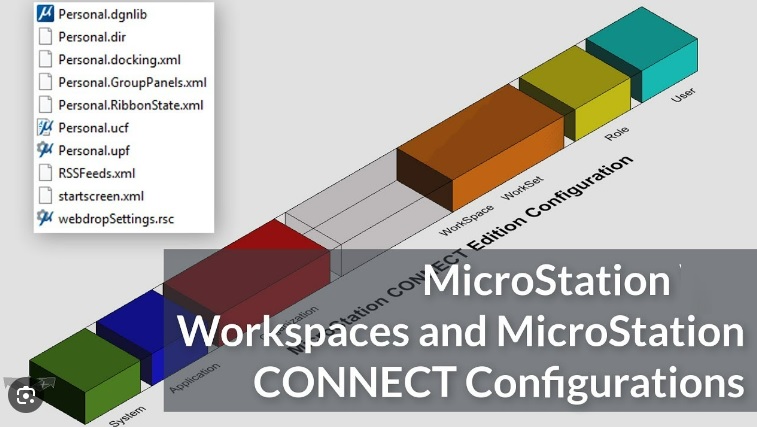
Setting up work environments with workspaces in MicroStation is crucial for efficiently managing your CAD projects. By configuring workspaces, you can create a personalized and streamlined work environment that aligns with specific project needs. This feature of MicroStation allows you to quickly access the most frequently used tools, settings, and files, thereby increasing your productivity and accuracy. Learning to manage and customize these workspaces is a key part of maximizing MicroStation’s potential for projects related to geoinformation and geodata.

Data Exchange and Interoperability

MicroStation’s strength lies in its ability to facilitate data exchange and interoperability between different CAD systems. This functionality is essential in projects rich in geoinformation and geodata, where collaboration and data integration across various platforms are a must. Through seamless integration and compatibility, MicroStation enables teams to collaborate efficiently and effectively, regardless of the software used, thereby increasing productivity and reducing the risk of errors.

In Geo-ICT’s MicroStation Management Course, you’ll discover how to work effectively with data exchange and interoperability. This course emphasizes the importance of smooth collaboration and the integration of geoinformation across various software platforms.

Why choose our MicroStation Management Course?

Choosing the MicroStation Management Course at Geo-ICT means investing in your professional growth within a field that is becoming increasingly important across many industries. This course stands out because of:

  • Expert instructors: Experienced professionals who combine in-depth knowledge of the software with practical experience.
  • Practical approach: The course is designed to provide you with immediately applicable skills.
  • Modern learning environment: Access up-to-date materials and techniques aligned with current industry standards.

By choosing this course, you’re taking an important step toward refining your skills in CAD software, with a special focus on MicroStation. You’ll not only learn the ins and outs of the program but also how to apply it effectively in your work, enhanced by knowledge of geoinformation and geodata.


Read more

Enroll

€895,- (VAT included)
  • Course duration: 2 days
Register for this course

Dagindeling

Day 1

  • Options and System Variables
  • Profiles
  • Desktop shortcuts
  • CUI
  • Toolbars, menus, ribbons, and panels
  • Workspaces
  • Partial CUI files and Enterprise CU

Geo-ICT Training Center, Nederland - cursus MicroStation Beheer

Day 2

  • Create, manage, export, and import
  • Processing and managing libraries
  • Managing in a network
  • Temporary files and configuration files
  • Managing templates
  • Autosave and Recycle Bin
  • Working with CAD standards (NLCS)
  • Working with sheet sets
  • Scripting and Introduction to VBA
  • Subscription Center Updates
Course duration: 2 dagen
Sign me up

Leerdoelen

  • Installation and Management of MicroStation
  • Configuration and setup of MicroStation
  • Ability to set up drawing standards such as NLCS
  • Setting up workspaces, interfaces, and settings
  • Data exchange and interoperability: Understand how to exchange data between MicroStation and other CAD software.
  • After completing this course, you will be able to perform the technical and functional management of MicroStation within your organization

Trainers

MW

Maarten Wouters

AutoCAD, MicroStation, Revit
4.5
104 beoordelingen
204 studenten gingen je voor

Arnout Hoogzaad

11 months geleden
Bekijk alle reviews

Want to know more?

Do you have questions about the course content? Or are you unsure whether the course aligns with your learning goals or preferences? Would you prefer an in-house or private course? We’d be happy to help.

Frequently Asked Questions About MicroStation Administration

This two-day training course focuses on managing and configuring MicroStation, including installation, administration, and setting up drawing standards such as NLCS.

This course is ideal for entry-level geospecialists, experienced geoprofessionals, and employees of companies in the geospatial sector who want to improve their MicroStation skills.

MicroStation is known for its advanced capabilities in data exchange, interoperability, and the customization of workspaces and interfaces, making it a powerful tool in the geospatial sector.

The course reviews basic skills such as installation, system variables, and the management of profiles and shortcuts, which are essential for effective technical and functional management.

The course covers setting up and managing drawing standards such as NLCS within MicroStation, which is crucial for standardized design processes.

The course provides an in-depth look at advanced MicroStation features, such as the CUI, toolbars, ribbons, and configuring complex project settings.

The course focuses on installing and managing MicroStation, configuring the software, setting up drawing standards such as NLCS, and setting up workspaces and interfaces.

The course teaches participants how to set up workspaces for different departments and individual drafters, including specific source files, user interfaces, settings, and tools.

Participants will learn about the management aspects of MicroStation, including setting up and managing projects, defining drafting standards, and implementing efficient workflows.

The course covers how data can be exchanged between MicroStation and other CAD software, which is essential for architecture, engineering, and construction projects.