The Importance of CAD in Modern Design
In today’s design and construction world, CAD software plays a crucial role. It enables designers, engineers, and architects to work with unprecedented precision and efficiency. But why has CAD become so fundamentally important in modern design?
First and foremost, CAD makes it possible to visualize designs before they become reality. This visualization aspect is essential not only for a project’s aesthetics but also for its functionality and feasibility. With CAD, you can work out every aspect of a design in detail, from the overall form to specific dimensions and materials. This leads to a deeper understanding and greater control over the final product.
Furthermore, CAD facilitates collaboration between different teams and disciplines. Files can be easily shared and viewed by everyone involved in a project, regardless of their location. This fosters a more integrated approach to project development, where every team member can provide input and share insights. This collaboration is particularly important in projects that involve a wide range of geoinformation and geodata, where the precise integration of different datasets is crucial for success.
Another aspect of CAD that cannot be overlooked is its efficiency in terms of time and resources. Traditional methods of manual drafting are time-consuming and prone to errors. CAD software, on the other hand, enables users to make changes quickly, reuse designs, and perform complex calculations automatically. This not only saves valuable time but also reduces the risk of costly errors during the construction phase.
Geo-ICT’s MicroStation course for CAD experts emphasizes these aspects of CAD software by focusing on the transition from BricsCAD or, for example, AutoCAD to MicroStation. This transition is crucial for professionals who want to expand their skills and adapt to the diversity of tools available in the industry. By delving into MicroStation, you’ll enhance your ability to work on a broader range of projects, from urban planning to complex infrastructure projects, all with the power and flexibility that modern CAD software offers.
So, whether you’re an experienced professional seeking further development or someone looking to take the leap into the world of technical design, understanding and mastering CAD software is indispensable. It not only takes your design skills to the next level but also opens doors to new opportunities and challenges in the exciting world of design and construction.
The Evolution of CAD Software
The world of CAD software has come a long way since the first digital drafting programs hit the market in the 1960s. Initially, these programs were limited in functionality, with basic line drawings and simple modeling as their core features. However, over the years, with advances in computer hardware and software technologies, CAD software has undergone an extraordinary evolution. From 2D drawings to complex 3D models and simulations, the possibilities have grown exponentially.
A major turning point in the evolution of CAD was the transition from 2D to 3D modeling. This opened up a new world of possibilities for designers and engineers, enabling them to create much more accurate and realistic designs. 3D modeling has radically changed the way we think about and work with design, allowing complex structures and systems to be viewed and analyzed from every angle.
Interactivity and real-time collaboration are other crucial developments in modern CAD software. Programs such as MicroStation now offer features that allow multiple users to work on the same project simultaneously, even from different locations. This fosters a dynamic work environment where ideas and changes can be shared and implemented immediately, which is essential in fast-paced project environments.
The integration of geographic information and geodata into CAD software is another significant advancement. This integration has opened the door to new applications in spatial planning, infrastructure design, and environmental research. By combining CAD with geographic information systems (GIS), designers and planners can now perform detailed, location-specific analyses, resulting in more informed and sustainable decision-making.
The MicroStation Course for CAD Experts emphasizes leveraging these advancements in CAD technology. The course is specifically designed to familiarize AutoCAD users with MicroStation, a platform known for its powerful 3D modeling capabilities and its ability to seamlessly integrate with GIS for integrated project development. This is particularly relevant for professionals working with geoinformation and geodata, as understanding and applying these advanced technologies is crucial for success in today’s design and planning projects.
This evolution of CAD software—from simple drafting tools to advanced design and collaboration platforms—highlights the ongoing need for professional development in the technical and design industries. By broadening your skills with knowledge of the latest CAD technologies, as offered in Geo-ICT’s course, you position yourself at the forefront of the industry, ready to tackle tomorrow’s challenges.
What You Will Learn in the MicroStation Course for CAD Experts
Transitioning from AutoCAD to MicroStation: A Smooth Transition
The switch from AutoCAD to MicroStation can feel like a big leap for many professionals in the world of design and engineering. Yet, with the right guidance and training, this transition can be surprisingly smooth. The MicroStation for CAD Experts course, offered by Geo-ICT, is specifically designed to make this transition not only achievable but also rewarding for any professional looking to expand their skills.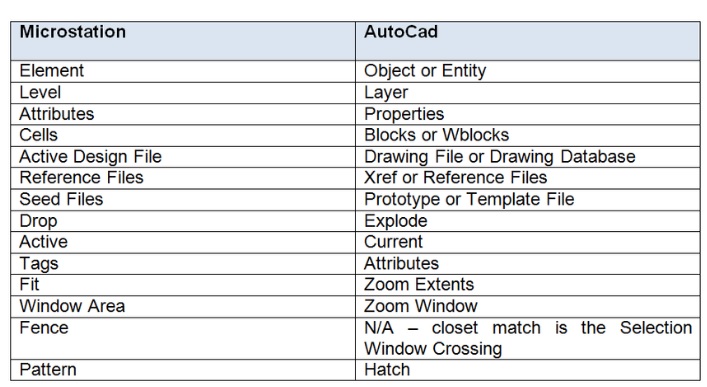
When switching to MicroStation, you’ll quickly discover the flexibility and power of this platform, taking your design skills to the next level. MicroStation is known for its robust 3D modeling capabilities and integration with geodata—aspects that are essential for projects in the geoinformation sector. These skills not only complement what you already know from AutoCAD but also offer new perspectives and techniques that can enrich your design process.
One of the most important aspects of this course is learning how to translate AutoCAD commands into MicroStation. This includes understanding the user interface, command line operations, and the unique tools that MicroStation offers. With this knowledge, AutoCAD experts can quickly become familiar with MicroStation and make the transition with confidence and expertise.
In addition, the course covers importing and converting existing AutoCAD drawings to MicroStation. This ensures that your existing projects and skills are not lost but instead gain a new dimension within a different software platform. This approach emphasizes the complementary relationship between AutoCAD and MicroStation, with the goal of making designers more versatile and valuable in their field.
Learning to work with AccuDraw, MicroStation’s precision drawing tool, and exploring the Color Palette and Command Line capabilities are further key aspects of the course. These tools improve the efficiency and accuracy of the design process, enabling you as a professional to work with greater complexity and refinement.
By participating in the MicroStation Course for CAD Experts, you’re not only taking a step forward in your professional development; you’re also expanding your toolkit with valuable skills that are invaluable in today’s technology-driven design and engineering world. This course serves as a bridge between two powerful CAD systems, enabling you as a professional to tackle a wider range of projects and challenges, from advanced design to integrated planning with geoinformation.
Advanced Features and Techniques in MicroStation
MicroStation is known for its advanced features and techniques that set it apart from other CAD software, such as AutoCAD. These advanced capabilities are not only impressive in terms of design and modeling flexibility but also offer a wide range of tools essential for projects rich in geoinformation and geodata.
One of the most valued aspects of MicroStation is parametric modeling. This allows you to create intelligent, reusable objects that can be easily adapted to different project requirements. These objects not only save time but also ensure a consistent design across different projects. The power of parametric modeling lies in the ability to quickly adapt complex designs without having to manually change every detail.
Visualization and rendering are two other powerful features in MicroStation. The software offers advanced rendering tools that produce realistic images and animations, bringing designs to life. These visualizations are not only useful for internal design reviews but also play a crucial role in communicating with clients and stakeholders by providing a clear picture of the expected end result.
Support for interoperability within MicroStation is another significant advantage. The ability to efficiently exchange data with other software packages, including GIS systems, strengthens MicroStation’s position in projects that require precise integration of geoinformation. This feature is particularly valuable in multidisciplinary projects where collaboration between different teams and technologies is essential.
Furthermore, MicroStation offers advanced analysis and simulation tools, enabling designers to evaluate the performance and sustainability of their designs before they are implemented. These analyses can range from structural integrity to energy efficiency, contributing to the design of more sustainable and cost-effective solutions.
Geo-ICT’s MicroStation Course for AutoCAD Experts offers a comprehensive introduction to these advanced features and techniques. By delving into the capabilities of MicroStation, you open the door to a new dimension of design and project development. This knowledge not only enables you to tackle more complex and challenging projects but also enhances your value as a professional in a competitive industry.
The transition from AutoCAD to MicroStation, with its advanced features and techniques, represents a significant step forward for any designer striving for excellence in their field. It is this progress that Geo-ICT aims to highlight and facilitate through its course, equipping professionals with the tools and knowledge needed to succeed in the ever-evolving world of CAD software.
Practical Applications and Project Management
The power of MicroStation extends beyond the design aspect alone; it also encompasses practical applications in project management and project execution. The integration of CAD software into the project management process has revolutionized the way projects are planned, executed, and delivered. This is especially true for projects rich in geoinformation and geodata, where MicroStation’s precision and level of detail are invaluable.
One of the most notable applications of MicroStation in project management is its ability to perform conflict detection and resolution. By leveraging MicroStation’s 3D modeling capabilities, project managers and designers can identify potential design issues before construction begins. This foresight can save significant time and costs by addressing problems early on.
Furthermore, MicroStation’s advanced documentation and data management features make it easier for teams to keep data organized and accessible throughout a project’s entire lifecycle. From initial design through construction and maintenance, all stakeholders can access the most up-to-date information, which is crucial for maintaining project efficiency and effectiveness.
BIM (Building Information Modeling) is yet another area where MicroStation plays a significant role. BIM involves creating and managing digital representations of the physical and functional characteristics of sites. MicroStation’s BIM capabilities enable teams to create and manipulate building information models, providing a deeper understanding of the project. This facilitates better decision-making throughout the building’s design, construction, and operations processes.
In addition, MicroStation facilitates multidisciplinary collaboration through its interoperability with other software and platforms. This ensures that architects, engineers, contractors, and project managers can collaborate efficiently, regardless of the software they use. This seamless collaboration is essential for delivering complex projects on time and within budget.
Geo-ICT’s MicroStation Course for AutoCAD Experts not only prepares professionals to use MicroStation for design purposes but also provides insight into how this software can be applied within the broader context of project management. By taking this course, you will not only improve your technical skills but also your ability to manage projects efficiently and effectively, from concept to delivery. Mastering both the design and management aspects of MicroStation will enable you to stand out in the increasingly competitive world of design and construction.
Why choose our MicroStation Course for CAD Experts?
Whether you want to make the switch from AutoCAD to MicroStation or further develop your skills in CAD software, choosing the right training provider is key. Our MicroStation Course for CAD Experts not only offers an in-depth introduction to MicroStation but does so in a way that is both engaging and effective. But why choose our course specifically? Here are a few reasons that set us apart:
- Expert Instructors: Our trainers are not only experienced in using MicroStation; they also have extensive backgrounds in applying CAD software to professional projects. This means you’ll learn from people who know not only the theory but also the practical application.
- Hands-On Learning Experience: We strongly believe in learning by doing. Our course includes many practical exercises that you can immediately apply to your own work. This helps you better understand and retain the material.
- Flexible Learning Paths: We understand that everyone has unique learning needs. That’s why we offer different learning paths within the course, so you can focus on the aspects of MicroStation that are most relevant to you.
Here are some specific benefits you can expect from our course:
- In-Depth Knowledge of MicroStation: You’ll learn all the ins and outs of MicroStation, from basic functionalities to advanced techniques. This includes:
- Parametric modeling
- Advanced visualization and rendering
- Effective data management and documentation
- BIM functionalities
- Application to Geoinformation: Because we specialize in the geoinformation sector, you’ll learn how MicroStation can be specifically applied in projects rich in geodata. This is a unique aspect of our course that you’ll struggle to find elsewhere.
- Networking Opportunities: By participating in our course, you’ll connect with professionals from various industries. This is a great opportunity to expand your professional network and learn from others’ experiences.
Choosing our MicroStation Course for CAD Experts means choosing a learning experience that not only improves your technical skills but also expands your professional opportunities. Whether you’re a freelancer, work within a company, or simply want to expand your knowledge, our course offers the tools and knowledge you need to succeed in the modern world of design and engineering.



