
The MicroStation Rendering course is particularly useful for architects, engineers, and CAD operators involved in creating 3D designs.
CAD - Bentley
The MicroStation Rendering course is particularly useful for architects, engineers, and CAD operators involved in creating 3D designs.
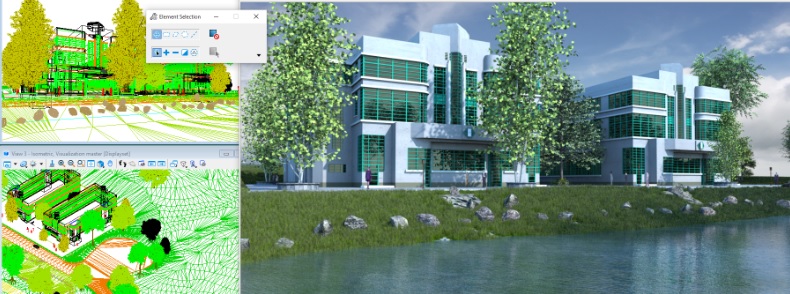 In the world of geoinformation and geodata, the power of 3D design and visualization has become indispensable. These technologies are transforming the way we understand and present the world around us. From developing complex urban planning schemes to accurately modeling geographic terrain, 3D visualization brings unprecedented depth and realism to our interpretations.
By utilizing 3D visualization techniques, professionals in the geospatial sector can convert complex datasets into understandable and interactive 3D models. This enables them not only to add a spatial dimension to their data but also to tell stories that would not be possible with traditional 2D methods. For example, MicroStation Rendering, a powerful tool offered by Geo-ICT, is specifically designed to meet this need.
It is important to understand that 3D design and visualization go beyond mere aesthetics. They play a crucial role in improving decision-making and the planning process. Through an accurate and realistic representation of geographic information, architectural designs, and urban development projects, stakeholders can gain a better understanding of the impact of their decisions before they are implemented. This not only saves time and resources but also increases the overall efficiency of projects.
Participants in our MicroStation Rendering course are not only introduced to the fundamentals of 3D modeling but are also immersed in advanced techniques for light and shadow effects, the use of textures and materials, and data exchange.
Prior knowledge of MicroStation 3D Modeling is required to take this course.
When entering the fascinating world of 3D visualization, you start with the basics. These fundamentals are crucial for understanding how advanced rendering tools, such as those in MicroStation Rendering, work. It’s not just about creating impressive images, but also about accurately representing geoinformation and geodata. By mastering the basic principles, you can create realistic scenarios in which every element—from light and shadow to textures and materials—contributes to the overall picture.
At the heart of 3D visualization and design lies the importance of realistic renderings. This authenticity is essential, not only for aesthetics but also for the functional analysis and interpretation of geoinformation. Realistic renderings not only help us bring projects to life in the eyes of the viewer but also facilitate decision-making and project planning. MicroStation Rendering offers advanced capabilities such as ray tracing and particle tracing, which contribute to creating accurate and lifelike images. By using these tools, you can mimic the subtle nuances of natural light and render materials as realistically as possible, which is invaluable in the world of geodesign.
Mastering both the fundamentals and advanced techniques in 3D visualization is at the heart of successful project execution in the world of geoinformation. In MicroStation Rendering, you’ll start with a solid foundation of basic skills, such as understanding geometric shapes, lighting effects, and materials. This knowledge will enable you to enhance your visual presentations with advanced rendering tools. This is not just about aesthetically improving your work, but also about adding a layer of technical precision that elevates your projects to a higher level. From simulating realistic lighting conditions to creating complex textures and materials, every skill contributes to your ability to tell compelling and accurate visual stories.
After the theory, it’s time for hands-on exercises. These exercises are essential for putting the knowledge you’ve gained about 3D visualization and rendering techniques into practice. At Geo-ICT, we understand that learning is best done by doing. That’s why our MicroStation Rendering Course is designed so that you get started with hands-on projects from day one. You’ll work with realistic scenarios, using advanced rendering tools, lighting techniques, and materials to create your own 3D visualizations. This approach not only helps you understand the theory but also see how it’s applied in the real world of geoinformation and geodata.
Choosing the MicroStation Rendering Course at Geo-ICT is a decision that will take your expertise in 3D visualization and design to the next level. Our course stands out thanks to a unique combination of factors that are essential for both beginners and advanced users in the world of geoinformation and geodata.
By choosing our course, you’ll not only be introduced to the fundamentals and advanced techniques of MicroStation Rendering, but you’ll also have the opportunity to deepen your skills in an environment that is both challenging and supportive. All while learning how to create realistic renderings that are indistinguishable from the real thing. Our approach ensures that by the end of the course, you’ll not only have a certificate in hand but also a deep understanding and practical experience with MicroStation Rendering.
The course begins with a review of the basics of MicroStation 3D Modeling. Following this review, the various functions that will be covered during the course will be demonstrated and explained. Afterward, you will get to work designing your own project. Through hands-on exercises guided by the instructor, you will learn about the various techniques for shaping your 3D design, such as environment maps, sky cylinders, and procedural textures.
On the second day of the course, you will continue working on your project. On this day, you will learn how to apply photorealistic materials and get started with lighting techniques. Later in the day, you will work with your own materials and advanced lighting techniques such as ray tracing and particle tracing.

Do you have questions about the course content? Or are you unsure whether the course aligns with your learning goals or preferences? Would you prefer an in-house or private course? We’d be happy to help.
MicroStation Rendering is an advanced CAD software feature used for visual presentations and 3D visualizations, particularly in the geoinformatics sector.
This course is ideal for aspiring geospecialists, experienced geoprofessionals, career changers, and employees of companies in the geospatial sector who want to improve their rendering skills.
In this course, you will learn how to use advanced rendering tools, including techniques for lighting, shadows, textures, and materials.
Mastering MicroStation Rendering allows you to create complex visual presentations, which is essential for many roles in the geospatial sector.
Yes, after the course, we offer technical support and opportunities for functional management to help you further develop your skills.
The course covers topics such as cameras, materials, lighting, environment settings, and rendering techniques, including the use of environment maps, sky cylinders, and procedural textures.
Yes, a basic understanding of MicroStation 3D modeling is required before you begin this course.
The course lasts two days. Day 1 begins with a review of MicroStation 3D Modeling, followed by hands-on exercises.
The learning objectives include understanding rendering techniques, effectively using rendering tools and settings, and creating realistic visualizations.
Yes, after the course, you can still ask questions via email for two weeks. You’ll receive a response within 24 hours.

