Want to learn how to automatically recognize and delineate objects in satellite and aerial imagery without having to code? In the QGIS Image Segmentation course, you’ll learn how to use QGIS and modern GeoAI techniques to independently perform geospatial image segmentation, based on Meta’s Segment Anything Model (SAM 3).
GeoAI image segmentation goes beyond traditional classification. Instead of predicting fixed classes, SAM learns to segment every object in an image, from buildings and roads to water bodies and vegetation units. This allows you to work flexibly and interactively with diverse datasets, regardless of sensor or resolution.
In QGIS Image Segmentation, you bring artificial intelligence directly into your daily GIS workflow. Whether you’re working on spatial planning, environmental monitoring, land use, cartography, or research—this course shows you how to apply AI segmentation practically and effectively, without writing a single line of code.
You’ll work with open-source software, take the course at your own pace, and develop a future-oriented skill set at the intersection of GIS and GeoAI. Technically innovative, yet clearly explained and immediately applicable.
What will you learn in the QGIS Image Segmentation course?
In this course, you’ll learn step-by-step how to apply GeoAI segmentation in QGIS using recent advanced plugins. You’ll start with the basics: what image segmentation is, how the Segment Anything Model works, and how to install and configure the plugin in QGIS.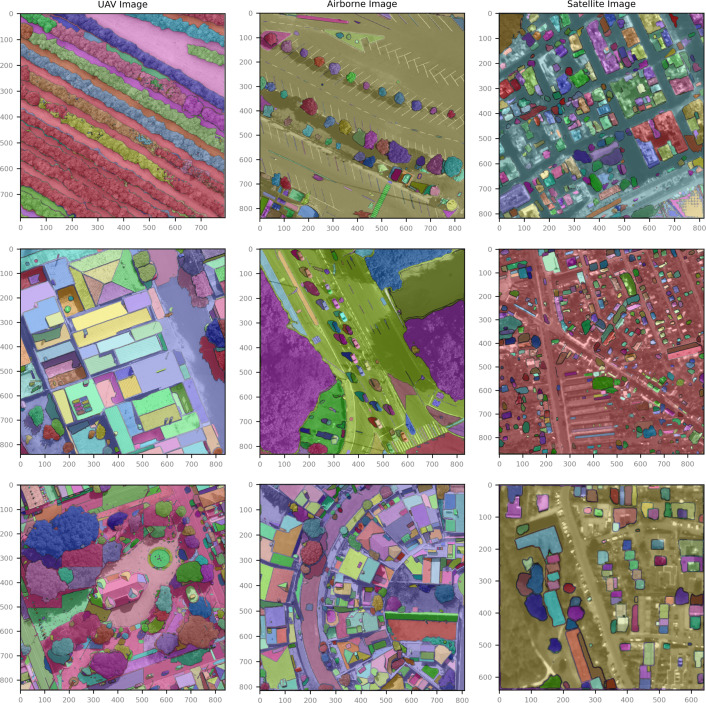
Next, you’ll get hands-on experience with satellite and aerial imagery. You’ll learn how to use interactive prompts (points, bounding boxes, and masks) to segment objects and how to save the results as GIS layers. You’ll also learn how to combine segmentations with existing vector and raster data in QGIS.
In addition, you’ll be introduced to applications such as:
- Object extraction (buildings, parcels, water, infrastructure)
- Support for land use and land cover analysis
- Preprocessing data for further GIS and remote sensing analyses
Through clear explanations and practical exercises, you’ll learn how to evaluate, refine, and apply AI-generated segmentations in realistic GIS projects.
In short: an accessible and practical introduction to GeoAI image segmentation within QGIS, with a focus on both understanding and application.
Why choose the QGIS Image Segmentation course
This course is unique because it makes advanced AI segmentation accessible to GIS users. While GeoAI is often associated with complex code and machine learning pipelines, this course shows that you can work productively right away with QGIS and GeoSam.
You will learn, among other things:
- What geospatial image segmentation is and how SAM differs from traditional classification
- How to install and use the SamGeo plugin in QGIS
- How to segment satellite imagery without programming
- How to convert AI results into usable GIS layers and analyses
The course is designed for independent and hands-on learning, using open-source tools and with a clear focus on applicability in real-world GIS scenarios.
Whether you want to experiment with GeoAI, accelerate your GIS workflow, or prepare for the future of spatial analysis—this course will give you the knowledge and skills to effectively utilize AI segmentation.
Who is this course for?
This course is intended for GIS users who want to go beyond traditional image analysis and are interested in AI-driven object extraction. Do you work in spatial planning, the environment, ecology, infrastructure, agriculture, cartography, education, or research? Then this course offers immediate added value.
You don’t need any prior experience with AI or machine learning, but you do need a basic understanding of QGIS. The course is designed to be practical and focuses on learning by doing.
Have you already worked with satellite imagery (such as Sentinel data) and want to extract objects from images faster, more flexibly, and more intelligently? Then QGIS Image Segmentation is a logical next step toward creating richer geographic insights with QGIS and GeoAI.


