









A point cloud is a collection of points in a digital 3D environment, often created through 3D scanning, that serves as the basis for modeling objects or environments in three dimensions.
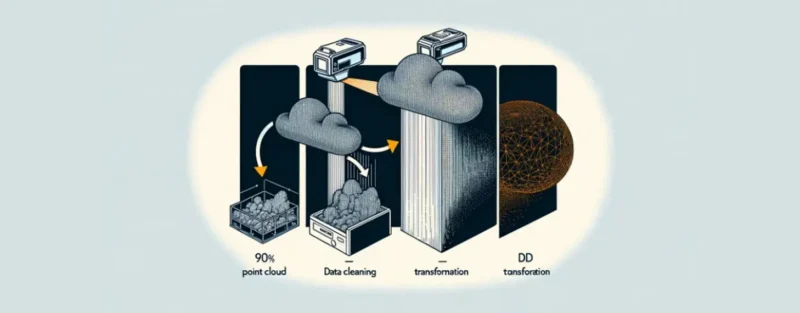
The transition from point clouds to 3D models opens up a world of possibilities across various industries by combining advanced scanning and modeling technologies. This article explores the process and techniques required to achieve this digital transformation, emphasizing how essential both technical expertise and creative insight are.
If you’ve ever worked with 3D modeling or are interested in its technical aspects, you know how important point clouds are as a starting point. These collections of digital points in a 3D environment—often created through 3D scanning—form the basis for modeling objects in three dimensions. But how do you go from a point cloud to a detailed 3D model? This is a question many professionals and enthusiasts ask themselves. With the right approach and tools, converting point cloud data into usable 3D models is not only possible but also a fascinating process.
The transformation from point cloud to 3D model is crucial in various industries, from architecture and engineering to game development and film production. It enables designers and engineers to model complex objects and environments with high precision. 3D scanning software and data conversion tools play a key role in this process, allowing raw data to be converted into detailed digital replicas.
This conversion is not just a matter of technology, but also of artistry. It requires a deep understanding of both the software and the physical object or environment being scanned. With cloud-based processing tools and advanced 3D modeling software, it is now easier than ever to process point clouds and convert them into detailed 3D models. These developments bring unprecedented possibilities for professionals in 3D modeling and offer a new dimension of precision and efficiency in their work.
Enthusiasm for the potential of 3D point clouds is growing, as it transforms the way we design, build, and even visualize the world around us. The key to success lies in understanding the core processes, the software that makes this possible, and the techniques for effectively processing the data. This article is your guide through this complex yet fascinating landscape, taking you from the basics of point clouds to advanced techniques for creating accurate and detailed 3D models.
Following the introduction to the transition from point cloud to 3D model, we’ll delve deeper into the core processes that make this transformation possible. It’s a journey that requires both technical skill and creative insight. You’re about to explore the fascinating world of 3D data conversion, a process in which every point in the cloud plays a role in shaping the final result.
It all starts with 3D scanning, where a physical object or space is scanned to generate a point cloud. This technology has developed rapidly, making it possible to capture objects with high precision and detail. However, it is the processing of these point clouds that reveals the real magic. 3D modeling software takes this raw data and converts it into a digital 3D model. This model can then be used for a wide range of applications, from architectural visualizations to virtual reality.
One of the most important steps in this process is the conversion from point cloud to mesh. This is where the individual points are connected to form a network of polygons, thereby creating the shape of the object. The precision of this step is crucial, as it lays the foundation for the accuracy and quality of the final 3D model.
Data conversion tools and cloud-based processing tools play an essential role in this process. They provide the computing power and algorithms needed to handle large datasets and perform complex conversions. These tools continue to evolve, making processes that were once time-consuming and complex faster and more accessible today.
An understanding of 3D visualization techniques is also important. It is not just about creating a model, but also about visualizing it in a way that is accurate and useful for the end user. This encompasses everything from texturing and lighting to simulating physical properties such as reflections and shadows.
These core processes form the backbone of point cloud-to-3D-model conversion. They illustrate the synergy between technology and creativity, a collaboration that is essential for successfully transforming digital points into a coherent 3D model. As you delve deeper into these processes, you will not only become proficient in using the tools and techniques, but you will also develop an eye for the art of 3D modeling, where every detail counts and contributes to the bigger picture.
Now that we’ve explored the core processes behind converting point clouds into 3D models, it’s time to delve deeper into the techniques and software that make all of this possible. These tools aren’t just the workhorses behind the scenes; they’re also the artists who transform raw data into stunning 3D creations.
3D scanning software forms the foundation of this process. There are countless options available, each with unique features, but they all share the same goal: accurately capturing reality in digital points. Faro Scene, Leica Cyclone, and Autodesk ReCap are some of the market leaders known for their efficiency and accuracy in scanning complex environments and objects.
Once the data is collected, point cloud processing software comes into play. This software, such as CloudCompare or MeshLab, allows users to clean, edit, and ultimately convert the collected point clouds into a mesh. It is a crucial step in which noise is removed and gaps are filled, resulting in a clean and usable model ready for further processing.
For converting a mesh into a fully structured 3D model, 3D modeling software is invaluable. Autodesk 3ds Max, Blender, and SketchUp are powerful tools widely used in the industry. They offer extensive capabilities for modeling, texturing, and lighting 3D objects, bringing digital creations to life.
Cloud-based modeling tools, such as Autodesk’s Fusion 360 and Onshape, allow users to work on projects anywhere and anytime. These tools facilitate real-time collaboration, which is essential for teams working on complex projects. They enable designers to quickly make changes, share models, and incorporate feedback, thereby accelerating the entire 3D modeling process.
Using this software and these techniques requires a deep understanding of both their capabilities and their limitations. Training and experience are crucial to harnessing the full potential of each program. Professionals who master these tools are able to push the boundaries of what is possible with 3D visualization, from creating realistic architectural visualizations to developing detailed models for virtual reality.
By choosing the right combination of techniques and software, you can not only tackle the challenges of point cloud-to-3D model conversion but also excel at creating models that accurately mimic reality. It is a constantly evolving field, where innovations and improvements are constantly opening new doors for creative and technical development.
Want to learn more about 3D scanning and modeling? Check out the 3D Scan Operator Course for in-depth training and hands-on experience.
At the heart of modern 3D modeling and point cloud conversion lies a technology that is revolutionizing the way we work: cloud-based data processing. This approach has transformed the accessibility and efficiency of 3D data processing, enabling teams from around the world to collaborate on projects without the limitations of local hardware.
Cloud computing offers unprecedented computing power, allowing the heavy datasets characteristic of point cloud data and 3D modeling to be processed effortlessly. This means you are no longer dependent on expensive, high-end computers; instead, you can rely on the cloud to do the heavy lifting. It makes processes such as converting point clouds into 3D models, data analysis, and visualization faster and more accessible than ever before.
The benefits of cloud-based tools extend far and wide. They not only offer scalability and flexibility but also allow users to receive real-time updates and improvements, ensuring a seamless and up-to-date work experience. Platforms such as Autodesk’s BIM 360 and Trimble Connect facilitate collaboration and project management, enabling teams to communicate efficiently and synchronize their workflows.
Another key aspect of cloud-based data processing is accessibility. No matter where you are, as long as you have internet access, you can work on your 3D projects. This breaks down geographical barriers and opens up new possibilities for remote work and international collaboration. It also enables small businesses and independent professionals to compete with larger organizations by providing access to the same powerful tools and technologies.
Security is another crucial advantage. Cloud providers invest significantly in securing their servers and ensuring the integrity and privacy of the data. This offers a level of security that is difficult for individual users or small businesses with limited IT resources to match.
As we look ahead, it is clear that cloud-based processing will continue to play a key role in the evolution of 3D modeling and point cloud processing. It opens the door to new innovations, more efficient workflows, and a future in which creative and technical boundaries are constantly being pushed. By embracing the power of the cloud, professionals in 3D modeling and point cloud processing can not only improve the quality of their work but also discover new ways to design, analyze, and visualize in an ever-changing digital world.
After exploring the role of cloud-based data processing in the world of 3D modeling and point cloud conversion, let’s take a closer look at the specific benefits and tools that make this technology so powerful. These tools are not only facilitators of efficiency and collaboration but also catalysts for innovation and creativity in the 3D world.
One of the biggest advantages of cloud-based processing is scalability. You can easily adjust computing power and storage space to the needs of your project without investing in expensive hardware upfront. This makes it more accessible for both small studios and individual designers to work with large datasets and create complex 3D models without compromising on performance.
Collaboration is greatly simplified with tools like Google Drive, Dropbox, and OneDrive, which enable seamless file sharing and version control. For specific 3D tasks, platforms such as Autodesk’s BIM 360 and Trimble Connect are designed to enable teams to work on the same model in real time, share feedback, and update changes immediately. This not only boosts productivity but also ensures closer integration of various areas of expertise within projects.
Cost savings are another significant advantage. By using cloud services, you avoid the need for large initial investments in hardware and software. Additionally, operational costs can be reduced by leaving the maintenance and updates of these platforms to the service providers. This means you can allocate more resources to the creative and innovative aspects of your projects.
Accessibility and flexibility are also key benefits. With cloud-based tools, you can work anywhere, on any device with internet access. This opens up opportunities for remote work and flexible hours, contributing to a better work-life balance for professionals in 3D modeling.
As for the tools, in addition to the collaboration platforms already mentioned, there are also specialized software packages such as Revit for BIM, SketchUp for rapid modeling, and Blender for everything from texturing to animation, all available via cloud-based licenses. This gives users access to the latest updates and features as soon as they are released.
Security should not be overlooked either. Cloud providers implement advanced security measures to protect data from unauthorized access and cyber threats. This offers peace of mind that is often difficult to achieve with on-premises storage solutions.
In conclusion, by integrating these benefits and tools into their workflow, professionals in 3D modeling and point cloud processing can revolutionize their work processes. They can tackle complex projects with greater efficiency, create innovative solutions, and collaborate in ways that were previously impossible—all while enjoying the flexibility and accessibility that the cloud offers.
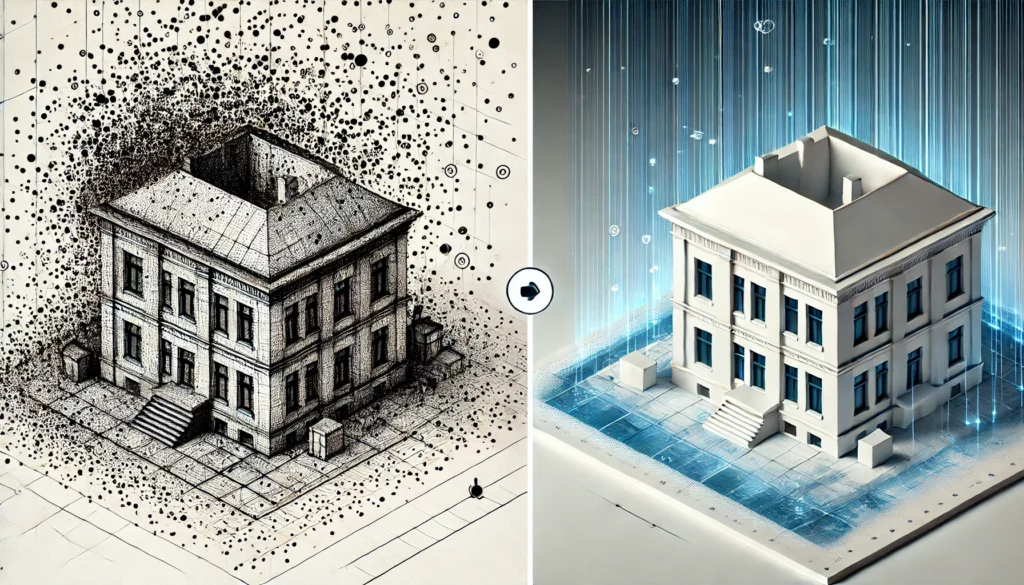
Converting a point cloud into a detailed 3D model may seem like a daunting task, but with the right approach and tools, it can be a streamlined and rewarding process. This step-by-step guide will walk you through the process, from the initial scan to the final 3D model, so you can tackle your own projects with confidence and expertise.
Step 1: 3D Scanning – It all starts with a high-quality 3D scan of the object or environment you want to model. Use reliable 3D scanning equipment capable of generating detailed point clouds. Make sure to scan the object from multiple angles to get as complete a picture as possible.
Step 2: Data Cleaning – Once you have obtained the point cloud, it’s time to clean it up. Remove noise and unnecessary points that do not contribute to the final model. Software such as CloudCompare or MeshLab can help with this, offering tools specifically designed for point cloud processing.
Step 3: Point Cloud to Mesh – The next step is converting your cleaned point cloud into a mesh. This process, known as triangulation, connects the points with lines to form a surface. This can be a time-consuming process, depending on the complexity and size of your point cloud, but it is crucial for creating a usable 3D model.
Step 4: Modeling and Refinement – With your mesh ready, you can begin modeling and refining your 3D model. 3D modeling software such as Blender or Autodesk 3ds Max offers powerful tools for adding details, adjusting textures, and optimizing the model for various applications.
Step 5: Texturing and Lighting – The final step in the process is adding textures and lighting to bring your model to life. This is where your creativity can truly shine, by applying realistic materials and lighting effects that give your model a lifelike appearance.
By following these steps, you can bridge the gap between a simple point cloud and a detailed, realistic 3D model. It’s a process that requires both technical skill and creative insight, but with practice and the right tools, anyone can learn to create impressive 3D models. The most important thing is to be patient and execute each step carefully, so that your final result is something you can truly be proud of.
Now that you’ve mastered the basics of the point cloud-to-3D-model conversion process, here are some practical tips that can streamline your work and improve the final result. These tips are designed to help you work more efficiently and avoid pitfalls that are common among beginners and even more experienced users.
By following these tips, you can not only improve the process of converting point clouds into 3D models but also enhance the quality and precision of your final products. Every project offers an opportunity to learn and further develop your skills, so approach each one with an open mind and a willingness to try new things.
After going through the essential steps and practical tips for converting a point cloud into a 3D model, it is clear that this process is a fascinating fusion of technology and creativity. The possibilities these techniques offer are nearly limitless, ranging from restoring historical monuments to designing futuristic cities. The importance of accuracy, attention to detail, and the use of the right tools cannot be overstated. These elements form the foundation of successful 3D modeling.
Cloud-based data processing has significantly improved the accessibility and efficiency of 3D modeling projects, enabling teams worldwide to collaborate on complex projects with unprecedented speed and flexibility. This opens new doors for innovation and collaboration that were previously unimaginable.
The practical tips shared—from planning to feedback—are designed to guide you through this complex process. They highlight the importance of a methodical approach, the importance of continuous learning, and the importance of community and collaboration in this field.
The process of transforming a point cloud into a 3D model is not only a technical challenge but also an artistic endeavor. It requires a combination of precision engineering and creative vision to transform data into models that are both aesthetically pleasing and functional. Whether you’re a beginner just starting to explore what’s possible with 3D modeling, or an experienced professional looking for ways to optimize your workflow, there’s always room for growth and development.
In the world of 3D modeling and point cloud conversion, where technology is evolving rapidly, it is crucial to stay up to date on the latest trends and developments. The future promises even more advanced tools and techniques that will further push the boundaries of what is possible. By applying the core principles discussed in this article and constantly challenging yourself, you can not only contribute to the field but also create exceptional works that illustrate the power of 3D modeling.
Let’s embrace this knowledge and these skills, and work together to create a future in which our virtual designs challenge and expand the boundaries of reality. The journey from point cloud to 3D model is just the beginning.

A point cloud is a collection of points in a digital 3D environment, often created through 3D scanning, that serves as the basis for modeling objects or environments in three dimensions.
The conversion process involves several steps, including 3D scanning, data cleaning, converting the point cloud into a mesh, and refining and texturing the 3D model using specialized software.
Processing point clouds requires various software tools, including 3D scanning software (such as Faro Scene or Autodesk ReCap), point cloud processing software (such as CloudCompare or MeshLab), and 3D modeling software (such as Blender or Autodesk 3ds Max).
Cloud-based data processing offers scalability, flexibility, and accessibility for projects, enabling collaboration and the sharing of 3D modeling projects anywhere in the world.
3D modeling plays a crucial role in the geospatial sector by enabling accurate visualizations and analyses of geographic data, which is essential for planning, design, and decision-making.